Avatar Studio: AI Avatars That Actually Look Like You
Avatar Studio, by ThinkML, is an AI platform that turns a selfie into a professional avatar in seconds while preserving your real facial features. Pick from dozens of ready-made styles, or customize with text. Plans start at $4.99, with 2K-4K resolution and commercial rights on paid tiers.
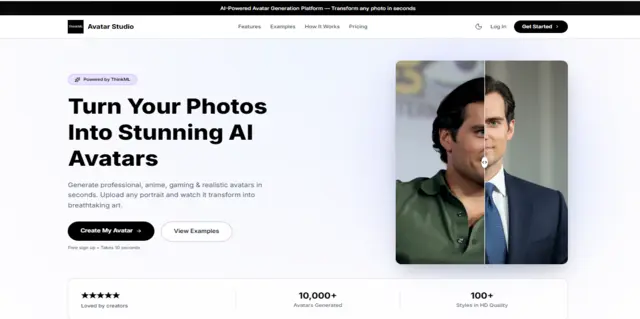
Avatar Studio is an AI-powered platform by ThinkML that turns an everyday selfie into a polished, professional avatar in seconds — without changing what you actually look like.
Your online presence is more important than ever. Whether you are working remotely, networking, or building a brand on social media, your profile picture is your first impression. But getting a great photo is often expensive and takes a lot of time to organize.
A quick selfie usually does not have the professional look or the creative spark you want. ThinkML built Avatar Studio to solve exactly that problem: a simple platform designed to take your everyday photos and turn them into stunning, professional avatars using advanced AI tools.
Why Are AI Avatars Usually So Hard to Get Right?
AI image tools are everywhere right now, but they usually come with two big problems for everyday people.
First, getting a good result is actually quite hard. You usually have to type out long, complicated instructions just to get the background or the lighting looking okay. Second, even when the picture looks beautiful, it rarely looks like you. Standard AI tools tend to change your face shape or smooth over the unique details that make you who you are. The end result is a pretty picture of a stranger.
Our team built Avatar Studio to fix both of these problems. We removed the need to type complicated instructions by giving you a library of dozens of ready-to-use styles — you just click the look you want. Most importantly, our system is built to preserve your identity: it maps your key facial features, like your eye shape and jawline, before applying the new style, so the result still looks like you, not a stranger. You get a crystal-clear, professional image that is generated in seconds, typically around ten seconds.
Who Is Avatar Studio For?
Avatar Studio is built for three main types of users:
We designed this tool to help absolutely anyone who needs a better profile picture.
1. Professionals and Job Seekers
First impressions on job networks are critical. Instead of paying for an expensive studio photoshoot, you can use our platform to make a confident, polished headshot in minutes.
2. Content Creators and Freelancers
Standing out online requires a unique look. Creators can use our artistic styles to make eye-catching profile pictures for video platforms and social networks.
3. Remote Teams
Companies often have messy team pages filled with a mix of casual selfies and old photos. Teams can use ThinkML's Avatar Studio to create a clean, matching set of avatars for their entire staff.
How Does Avatar Studio Work?
Getting a finished avatar takes three steps and no design experience:
1. Upload Your Photo
Start by uploading a clear photo of your face. A simple selfie taken in good lighting works perfectly.
2. Choose Your Style
Pick a look from our large library of styles. Whether you want a cinematic edit or a clean office background, you just click the one you like.
3. Generate and Download
Within moments, the studio creates your new avatar. The image is ready to download immediately, so you can upload it straight to your profiles.
Choose from Dozens of Ready-Made Styles
One of the hardest parts of using AI is figuring out what to type to get a good result. We took that frustration away. Avatar Studio comes packed with finely tuned styles for any occasion.
1. Professional and Corporate
Instantly make polished images for work. Try the Corporate Professional style for a clean studio look, or the Quiet Luxury Old Money preset for a sophisticated outfit and soft natural lighting.
2. Cinematic and Editorial
Place yourself in stunning environments that look like magazine covers. Popular choices include Cyberpunk with its glowing neon cityscapes, Neon Rain Street for a moody urban feel, Y2K Glossy Editorial for a bright beauty campaign finish, and Rooftop Golden Hour for warm sunset colors.
3. Artistic and Illustrative
Turn your photo into a beautiful piece of art. Choose traditional styles like Watercolor and Oil Painting, or fun digital illustrations like Anime, Studio Ghibli, Pixar, and bold Comic book art.
4. Nostalgic and Retro
Step back in time with our vintage filters. The 90s Vintage style mimics the warm flash of an old disposable camera, while the 70s Retro style adds a classic film look. You can even place yourself in a glamorous Gatsby 1920s Ballroom.
5. Pop Culture and Sports
Have fun with your digital identity. Become an epic Fantasy Warrior, star in your own Superhero Movie Poster, or celebrate your favorite sport with the FIFA Hero Poster and Sports Trading Card templates.
Can I Customize My Avatar Beyond the Presets?
Yes — Avatar Studio offers three ways to go beyond the preset styles: dual quality models, custom text instructions, and saved creation history.
While our ready-made styles make things incredibly easy, we know some people have a very specific vision in mind.
1. Dual Quality Options
Avatar Studio uses two different smart models to give you the perfect balance of speed and quality. Our Flash model is incredibly fast and creates stunning 2K resolution images, which is perfect for everyday social media. For projects that need maximum detail, our Pro model unlocks brilliant 4K resolution. This gives you the sharpest textures and best lighting for commercial use.
2. Custom Instructions
If you cannot find the perfect style in our library, you can type your own instructions. This lets you control the exact lighting, clothing, and background. You tell the system exactly what you want to see.
3. Your Personal History
We know that picking the perfect avatar takes time. Avatar Studio saves your past creations in a personal history dashboard. Depending on your plan, your images are safely stored for anywhere from 1 day to 1 full month. This gives you plenty of time to compare your options and download your favorites.
Avatar Studio vs. Other Options
Here's how Avatar Studio compares to the two most common alternatives — typing prompts into a generic AI image tool, or booking a professional photographer:
| Avatar Studio | Generic AI Prompting | Professional Photographer | |
|---|---|---|---|
| Cost | From $4.99 | Varies / subscription | $150–$500+ |
| Time to result | Seconds | Minutes of trial and error | Days to weeks (booking + editing) |
| Keeps your real face | Yes, by design | Often inconsistent | Yes |
| Skill required | None — click a style | Prompt-writing skill needed | None |
How Much Does Avatar Studio Cost?
Avatar Studio uses a one-time credit system across three plans, starting at $4.99.
Booking a professional photographer is expensive. We believe great digital avatars should be affordable and instant. We use a simple credit system and offer three plans to fit your needs.
1. Starter Package ($4.99)
Perfect for someone who just wants to update their profile picture. This plan gives you 25 total avatar creations using 20 Flash credits and 5 Pro credits. You get 2K resolution, custom instructions, no watermarks, and 1 day of image storage. This plan is for personal use.
2. Hobbyist Package ($9.99)
Our most popular plan, made for active creators. This package gives you 60 total creations using 45 Flash credits and 15 Pro credits. You get everything in the Starter package, plus 1 week of image storage and the right to use your images for business and branding.
3. Pro Studio Package ($19.99)
Built for professionals who need the absolute best quality. This plan gives you 130 total creations using 95 Flash credits and 35 Pro credits. It unlocks our ultra-crisp 4K resolution. You also get 1 full month of image storage and full commercial ownership of your images.
Frequently Asked Questions
1. Do I need a professional photo to start?
No. A simple selfie from your phone is all the system needs to read your face perfectly.
2. How long does it take to make an avatar?
It is very fast. Once you pick your style and click generate, your new avatar is usually ready in a matter of seconds.
3. Who owns the rights to my generated avatars?
Users on the Hobbyist and Pro Studio plans get full commercial rights, meaning you can use the avatars for your business, marketing, or brand.
4. Is my personal data safe?
Yes. Avatar Studio is built on a highly secure foundation. We safely manage how your images are processed, and we automatically delete your images based on the strict time limits of your plan. This ensures your personal photos are handled responsibly.
5. What's the difference between the Flash and Pro models?
Flash is optimized for speed and produces 2K images, ideal for everyday social media use. Pro takes longer and produces 4K images with sharper detail, better suited for commercial or print use.
6. Can I use my Avatar Studio image on LinkedIn or other social platforms?
Yes. Once downloaded, the image is yours to upload anywhere. Commercial use — including on business or branding profiles — requires the Hobbyist or Pro Studio plan.
7. How is Avatar Studio different from typing prompts into a general AI image tool?
Generic AI tools require you to describe the look you want in text and often alter your facial features in the process. Avatar Studio replaces that with one-click presets and is built specifically to preserve your real face.
Try Avatar Studio Today
We invite you to explore everything ThinkML's Avatar Studio has to offer. Whether you want to update your work headshot, get matching pictures for your team, or just have fun with digital art, our platform has the tools you need.
This launch is just the beginning. We are working hard behind the scenes to bring you more features and fresh new styles very soon.
Visit our official website at ThinkML Avatar Studio to create your account, browse our huge library of styles, and see what you look like in a whole new light.